
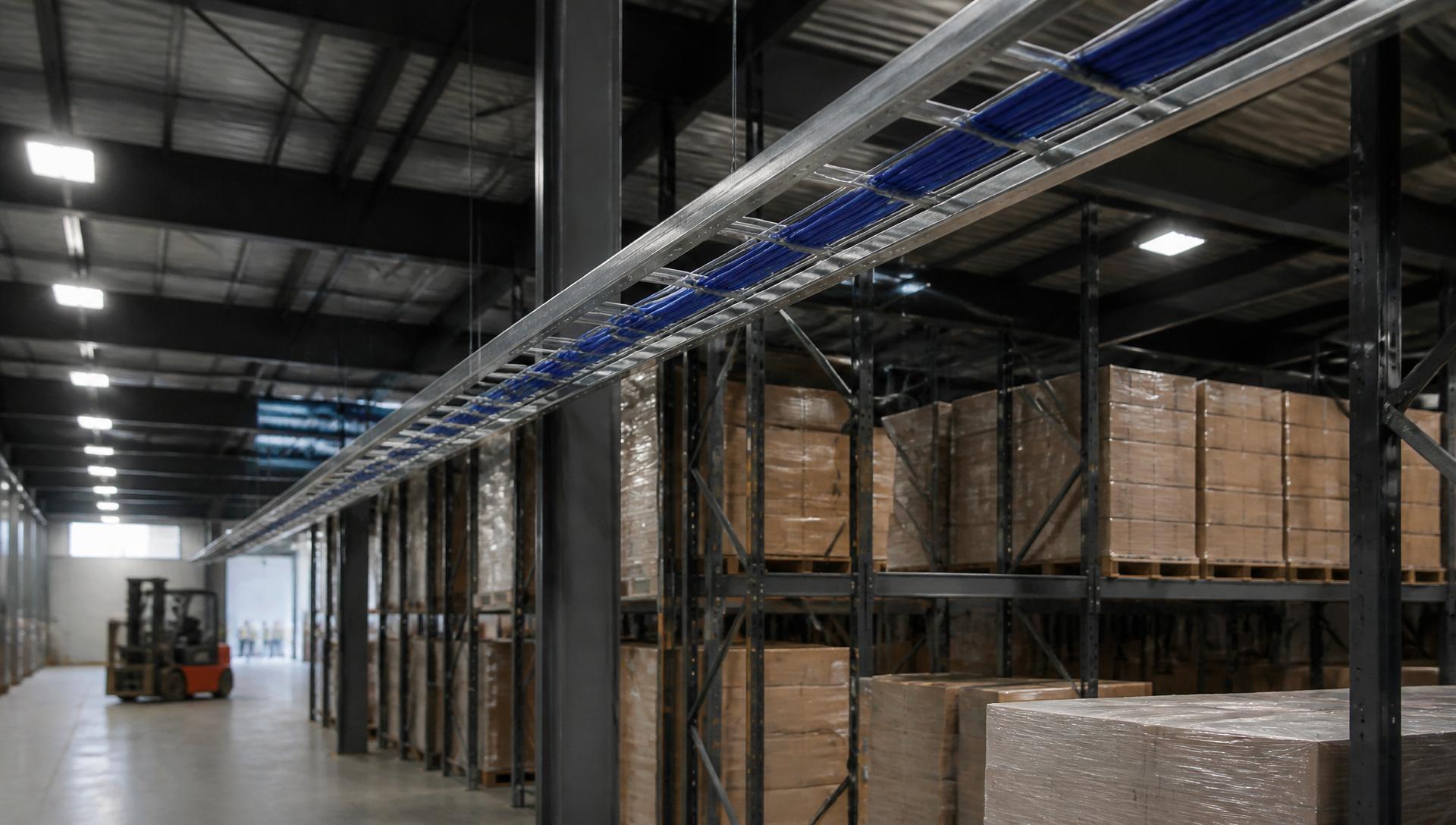
Warehouse Network Cabling Services In Milpitas
Commercial warehouse cabling, fiber backbone, high-bay Wi-Fi, barcode-scanner networks and security systems — engineered for Milpitas distribution centers, manufacturing plants and 3PL facilities.
A warehouse is not a large office.
That sounds obvious until you're standing in one trying to figure out why a mezzanine access point keeps dropping handheld scanners, or why the cable someone ran along a rack six months ago is now pinched behind a load of pallets. Most of the network problems we get called out to fix in Milpitas warehouses trace back to the same root cause: the building was wired using assumptions that belong in a corporate office, not a 30-foot-tall industrial space with forklifts moving through it all day.
This page walks through how warehouse and distribution center cabling actually gets planned and installed, what tends to go wrong, and what to think about before you sign off on a design. If you manage or oversee a facility in Milpitas — whether it's a distribution hub, a manufacturing plant with an attached warehouse, or a 3PL site handling inventory for multiple clients — this is meant to be a genuinely useful reference, not a sales pitch dressed up as one.
Warehouses have different network requirements
Office cabling is mostly a solved problem. Warehouses break almost every one of those assumptions.
Cable runs are long, and distance matters
A standard office IDF might serve a floor with runs under 100 meters. In a large warehouse, getting from a network closet to a receiving dock or the far end of a racking aisle can easily approach or exceed copper's distance limits. That changes the design — you're not just picking a cable type, you're deciding where fiber needs to take over from copper, and where a satellite IDF makes more sense than one long run.
Ceiling height changes everything
Office APs sit eight or nine feet up, close to the users they serve. Warehouse ceilings run 24 to 40 feet, sometimes higher. An access point mounted at that height has a different coverage pattern and antenna requirement than one in a drop ceiling, and running cable to it isn't a five-minute job with a stepladder — it's a lift, a pathway that has to survive up there indefinitely without easy access.
Forklift and pallet-jack traffic is a constant threat
Cable and conduit that would be safe in an office gets run over, snagged, or crushed in a warehouse if it's not routed and protected correctly. This is the single most common repeat issue we see in facilities that were cabled without industrial routing practices in mind.
Racking systems move and change
Warehouse racking gets reconfigured as inventory needs shift or a client's storage requirements evolve. Cabling that was run assuming racks would sit in one place forever becomes a problem the first time operations wants to reconfigure an aisle. Good design accounts for the fact that the floor plan is not permanent.
Wireless has to serve people who are moving
Forklift-mounted tablets, handheld scanners, and voice-picking headsets all need continuous connectivity as workers move through aisles, up to mezzanines, and out to dock doors. A dead zone in a warehouse means a scanner drops mid-transaction, an inventory record doesn't sync, or a picker loses their list.
Scanners depend on the network being right, not just present
Inventory counts, order fulfillment, and shipping accuracy all rely on scanners talking to a warehouse management system continuously. Latency or dropped connections don't just slow someone down; they create inventory discrepancies that take hours to reconcile.
Industrial equipment introduces electrical interference
Motors, conveyor systems, large HVAC units, and forklift charging stations all generate electrical noise. Cabling routed too close to this equipment, or without proper separation and shielding, is more prone to interference than anyone expects until it starts causing intermittent problems that are hard to diagnose.
Temperature swings are real
A warehouse near loading docks can swing from conditioned interior temperatures to near-outdoor conditions every time a dock door opens. Cold storage adds another layer entirely. Cable, connectors, and enclosures all need to be rated for the environment they're going into.
Future expansion is the rule, not the exception
Warehouses get expanded, mezzanines get added, racking gets reconfigured, and automation gets introduced years after the original build. A network design that doesn't leave room — physically and in terms of capacity — for that growth turns into a re-cabling project a few years down the line.
Common warehouse technology systems
Most warehouses run several systems that share one physical infrastructure. Here's how the pieces fit together.
Commercial network cabling
The structured cabling foundation that connects switches, access points, cameras, and workstations back to a central point — usually a mix of copper for shorter runs and fiber for distance.
Fiber backbone
Connects the main distribution frame (MDF) to satellite IDFs spread across the facility. In a large warehouse this is almost always necessary and gives you bandwidth headroom for whatever gets added later.
CAT6A copper
The standard for warehouse copper runs — higher bandwidth and better resistance to interference than older cable categories, a meaningful advantage in a building full of motors and electrical equipment.
Warehouse Wi-Fi
Covers the floor for scanners, tablets, and voice-picking devices. This is its own design discipline in a warehouse — high-bay APs, roaming, and coverage planning around racking.
Security cameras
Cover dock doors, yard areas, high-value inventory zones, and building perimeters, often at greater distances and in more variable lighting than office camera systems.
Access control
Manages who can get into the building, specific zones, cages holding high-value inventory, or restricted areas — often integrated with the same cabling infrastructure as cameras.
Barcode scanners
Handheld and fixed-mount at conveyor or dock locations. Depend on consistent wireless or wired connectivity to function as intended.
Shipping and receiving stations
Typically need a denser concentration of drops than the rest of the floor — workstations, label printers, scales, and scanners all cluster in these zones.
MDF and IDF closets
The nerve centers of the whole system. Placement and count depend heavily on the building's footprint and layout.
Warehouse Wi-Fi is its own discipline
Coverage, roaming, and high-bay mounting have to be planned for the specific building — not copied from an office template.
Coverage around racking
Radio signals behave differently around tall metal racking, dense inventory, and open high-bay ceilings than they do in an office with drywall partitions. A coverage plan that ignores how racking and inventory will actually be arranged tends to leave gaps that only show up once the shelves are full.
Roaming performance
Devices are constantly moving — a forklift-mounted tablet or handheld scanner needs to hand off between access points without dropping the connection or interrupting whatever transaction is in progress.
High-bay access points
Built and mounted differently than standard office units, generally using antennas and placement suited to covering long, narrow aisles from significant height.
Receiving and shipping density
These high-activity zones often need denser or differently-aimed coverage than the general warehouse floor, since a lot of scanning and data entry happens at once.
Forklift connectivity
A large piece of moving metal equipment can itself interfere with signal, and mounting hardware on a forklift needs to hold up to vibration and impact.
When fiber becomes the practical choice
Fiber isn't automatically necessary in every warehouse, but it becomes important once distance, bandwidth, or future planning enter the picture. Backbone connections between a main distribution frame and satellite IDFs are the most common use — those runs frequently cover distances that would be unreliable over copper.
Long-distance runs to far corners of a large facility, a detached office building, or a separate warehouse structure on the same property are another common fiber application. Future bandwidth needs — automation systems, expanded camera counts, additional wireless capacity — are far easier to accommodate when fiber is already in place with spare strands, rather than retrofitting later. Every fiber run should be tested for signal loss and continuity regardless of how confident the installer is in the workmanship.
Warehouses carry physical risks a typical office doesn't
Cable protection
The first line of defense against the daily wear of an active warehouse floor — proper tray, conduit, and routing height keep cable out of the path of equipment and foot traffic.
Forklift damage prevention
One of the most common causes of network outages in warehouses, almost always traceable to cable or conduit routed at a height or location where it was going to get hit eventually.
Conduit in high-risk zones
Rigid protection near dock doors, at floor level, or anywhere equipment regularly passes close to the pathway.
Fire stopping
Required at every point where cable penetrates a fire-rated wall or floor — a code requirement, not an optional finishing touch, and frequently missed by installers unfamiliar with industrial buildings.
Dust and ventilation
A real concern in warehouses. Network gear installed without airflow in mind tends to fail early from heat buildup.
Coordination with other trades
Electricians, HVAC contractors, and racking installers all compete for the same overhead and wall space — coordination is essential on any warehouse project.
From site survey to owner walkthrough
- Step 1
Survey
A physical walkthrough of the facility to document existing conditions, racking layout, ceiling heights, and anything that will affect the design.
- Step 2
Planning
Turning the survey into a design — pathway routing, closet locations, cable counts, device placement — with input from your operations team on how the space is actually used.
- Step 3
Scheduling
Warehouses rarely shut down for cabling. Work gets scheduled around active operations, sometimes in phases or during off-hours to minimize disruption.
- Step 4
Installation
Cable gets pulled, terminated, and organized according to the plan, with pathway work — tray, conduit, J-hooks — happening alongside it.
- Step 5
Testing
Every cable run gets verified against the relevant performance standard before the project is considered complete.
- Step 6
Labeling
Every cable, port, and panel gets labeled consistently so the system is maintainable long after the installation crew leaves.
- Step 7
Documentation
As-built drawings and test results get compiled and handed over — a permanent record of exactly what was installed and how it performs.
- Step 8
Owner walkthrough
A final walkthrough with your team confirms everything works as intended and gives you a chance to ask questions before sign-off.
Warehouse types we cable in Milpitas
- Distribution centers
- Manufacturing
- Cold storage
- Food processing
- E-commerce fulfillment
- Medical distribution
- Automotive parts
- Technology hardware
- Government facilities
A crossroads for Silicon Valley distribution
The city's industrial parks host a mix of manufacturing operations, distribution facilities, and logistics providers that serve the broader Silicon Valley technology sector — companies that need components, hardware, and finished goods moving efficiently between suppliers, assembly, and customers. That kind of operation depends on inventory accuracy and network reliability in a way that a lower-throughput facility elsewhere might not.
Because so many Milpitas warehouses serve or are adjacent to technology companies, expectations around infrastructure quality tend to run higher here than in some other markets — tenants and operators are often more familiar with what good network design looks like, and less tolerant of a system that only sort of works.
Milpitas sits at a crossroads for distribution serving the greater Bay Area, which means many facilities here are handling higher volumes and tighter turnaround expectations than a standalone regional warehouse might. That puts more weight on wireless reliability, scanning accuracy, and network uptime, since delays ripple outward to everyone downstream.
Commercial growth in the area also means a lot of the warehouse stock here is either being newly built, expanded, or repositioned for a new tenant — all natural moments to get the network infrastructure right, rather than working around a decade-old system that was never designed for how the space is actually being used today.
Warehouse cabling questions we hear in Milpitas
How is warehouse cabling different from office cabling?+
Warehouse cabling has to deal with much longer distances, high ceilings, physical hazards from forklifts and equipment, and coverage requirements for mobile devices — all of which change the materials, pathway design, and wireless planning compared to a standard office build.
Do I need fiber optic cabling in my warehouse?+
It depends on your building's size and layout. Once distances exceed what copper reliably supports, or if you want bandwidth headroom for future systems, fiber backbone between your MDF and IDFs generally makes sense.
How many wireless access points does a warehouse need?+
There's no fixed number — it depends on ceiling height, racking density, building materials, and how the space is used. A proper wireless survey of your specific facility is the only reliable way to determine this.
Can cabling be installed while our warehouse stays operational?+
In most cases, yes. Warehouse cabling projects are typically scheduled in phases or around active operations to minimize disruption to your team.
What cable category should we use for a new warehouse build?+
CAT6A has become the common standard for warehouse copper runs due to its bandwidth capacity and improved resistance to the electrical interference common in industrial environments.
How do you protect cabling from forklift damage?+
Through a combination of routing height, conduit in high-risk zones, and cable tray systems designed to keep cabling well out of the path of moving equipment.
Do barcode scanners need a dedicated network?+
Not necessarily a separate physical network, but they do need wireless coverage and roaming performance designed specifically around how scanners move through the facility during a shift.
What is an IDF and how many does our warehouse need?+
An IDF is an Intermediate Distribution Frame — a satellite network closet connected back to a main MDF. Large warehouses often need multiple IDFs so copper runs stay within distance limits and every zone has a nearby home for switches and patch panels.
Explore the systems behind a warehouse network
Warehouse cabling across the South Bay
Build the commercial network your business actually deserves.
28 years, thousands of sites, one accountable contractor. Get a free site survey and an itemized quote in 48 hours.